
Comparing Table.AlternateRows with List.Alternate in Power BI and Power Query

I must admit that I had more than one unsuccessful attempt to try to fully understand how the List.Alternate-function works. What helped me at the end, was the function Table.AlternateRows. It pretends to be similar to List.Alternate, but holds some surprises that I will uncover in this blogpost: How Table.Alternate works Say I have the … Read more
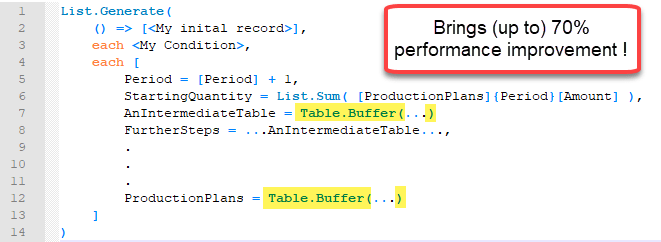
Performance tip for List.Generate (1): Buffer your tables in Power BI and Power Query

Lately I was working on a fairly advanced allocation algorithm on large data which forced me to search for different tricks to improve performance than those that you can find on my site here already. Background I was using List.Generate to check for every month in my table, if there was enough free capacity on … Read more

How to do a real VLOOKUP (false) in Power Query or Power BI

When you merge tables with distinct keys in Power Query you will get the same result than the VLOOKUP-function in Excel returns (if this is new to you, check out this article for example: https://www.myonlinetraininghub.com/excel-power-query-vlookup) . But how to retrieve only the result of the first row, if the lookup-table has multiple rows with the … Read more

Fast and easy way to reference previous or next rows in Power Query or Power BI

When you search the web for solutions to reference previous or next rows in the query editor of Power BI or Power Query, you will find many solutions that base on an added index-column. But the problem with these solutions on large tables is that performance will range between slow and extremely slow. In this … Read more

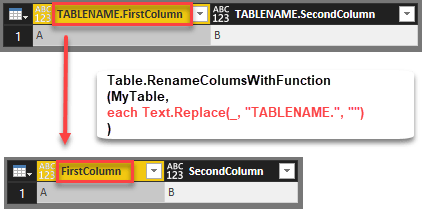
Efficiently rename columns with a function in Power BI and Power Query

Edit 2018-July-05: As it turns out I’ve missed the native function that exists with exact the same functionality: Table.TransformColumnNames Thanks to Tristan Malherbe for pointing this out 🙂 But anyway: If you want to understand what it does and how you could have written it by yourself – read along: The standard function to rename … Read more

Automatically expand all fields from a JSON document in Power BI and Power Query

If you work with JSON documents that are new to you, it can be very helpful to fully expand JSON to see at a glance what’s in there. The following function has you covered for this task. It returns a table with all values in column “Value” and additional columns describing where that value came … Read more