Edit 7th Feb 2017: Friendly reader Roknic pointed out in the comments below that there’s actually an existing function for it in M: Table.TransformColumnNames 🙂
So the first of my example below would actually look like this:
Table.TransformColumnNames(Source, each Text.Replace(_, " ", "_"))But still keeping my original post here, as the transformations in them might help for other use cases:
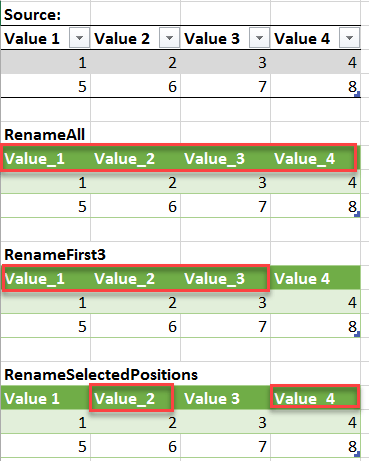
If you want to rename all of your table’s columns with a common rule, like “replace all spaces by underscore” or just “delete all spaces”, check out this easy method:

The above formula will replace all spaces (” “) by underscores (“_”).
How does it work:
The 2nd argument in the Table.RenameColumns-formula is a list of lists, just like in Table.TransformColumnType from this article. So we apply the same technique here: List.Transform transforms a single element from a list into a list-item, whose 2nd argument will be calculated with a Text.Replace-function.
Variations: