How to get more out of your Graph API custom connector in Power BI

Edit: Microsoft has announced that they don’t support querying MS Graph in Power BI: Lack of Support for Microsoft Graph in Power Query – Power Query | Microsoft Learn

The Graph API can deliver a huge amount of interesting data from your Microsoft 365-universe, but the Graph API custom connector for Power BI is not able to retrieve everything from it in its current shape. So I’ve modified it a bit to squeeze out a bit more of its sweet juice.

Problem

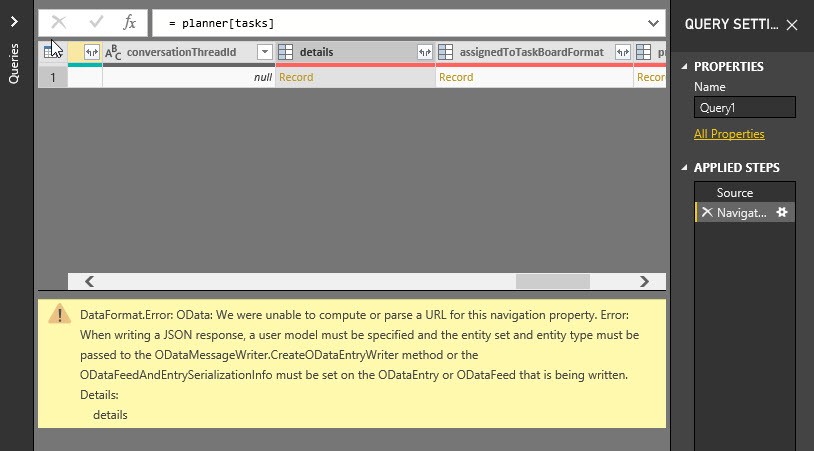
When trying to get the details for planner tasks, the following error-message appears:

Error in Graph API custom connector when retrieving details from planner tasks

Solution

Read more

Export data from Power BI using Microsoft Flow

Edit 5th May 2019: Unfortunately this method will not work in the Power BI service!

Edit 23rd August 2021: Pedro del Melo Cabral Sousa has found a workaround how to make this method work in the service. I haven’t had the chance to test this out, but you might want to give it a try: “if you migrate the necessary queries to power bi dataflows and then create one big query in your report dataset with all the necessary references to the power bi dataflows together with the POST request, it will work in Power BI Service”

In my last 2 posts I’ve described a way to automatically validate attachments from incoming E-mails. Microsoft Flow would watch for incoming E-mails, that match certain criteria and move their attachments to a dedicated folder. Then it would trigger a refresh of a Power BI dataset, that has been designed to check for errors in those attachments. Data driven alerts in Power BI would indicate if there are errors and trigger a Flow that sends an E-mail back to the sender, informing him that his attachments didn’t meet the agreed criteria.

In this article I will now explain how not just a trigger about the existence of a faulty attachment could be passed back to Flow, but also the corresponding data itself. Therefore I write a query that exports data from Power BI to Flow. But watch out: This is not suitable for very big tables. I experienced timeouts at tables with 300k rows already. Also, you need a paid Power Automate license for the connector (Pricing | Microsoft Power Automate).

Read more

Part 2: Automatically validate E-mail attachments with Flow and Power BI

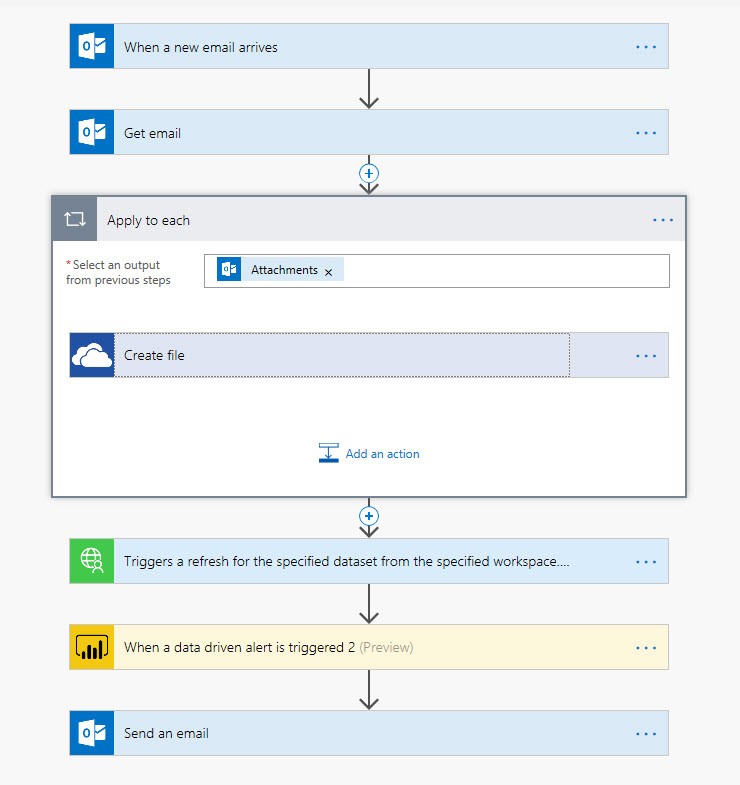
In Part 1 of this little series I described the core-Flow on how to automatically validate E-mail attachments with Flow and Power BI. It automatically sends an e-mail to a business partner who sent an attachment, that didn’t meet the agreed specifications:

Automatically validate e-mail attachments – Part1

But before going live with this Flow, you should consider the following aspects:

Caveats

Read more

Writing data to GitHub using Power Query only

You shouldn’t do it …

Generally it’s a very bad idea to execute commands in Power Query that write out data to a source, as these commands might be executed multiple times (https://blog.crossjoin.co.uk/2018/10/07/power-query-write-data/)

… unless … maybe ?

However, as with most good rules, there are exceptions. I leave it to you to decide whether my use case here is a valid candidate for it. It doesn’t execute the code twice, because I execute the query only from the query editor and none of the other queries is referencing its results. But please see for yourself – Writing data to GitHub using just Power Query:

The video

Read more