Edit 5th May 2019: Unfortunately this method will not work in the Power BI service!
Edit 23rd August 2021: Pedro del Melo Cabral Sousa has found a workaround how to make this method work in the service. I haven’t had the chance to test this out, but you might want to give it a try: “if you migrate the necessary queries to power bi dataflows and then create one big query in your report dataset with all the necessary references to the power bi dataflows together with the POST request, it will work in Power BI Service”
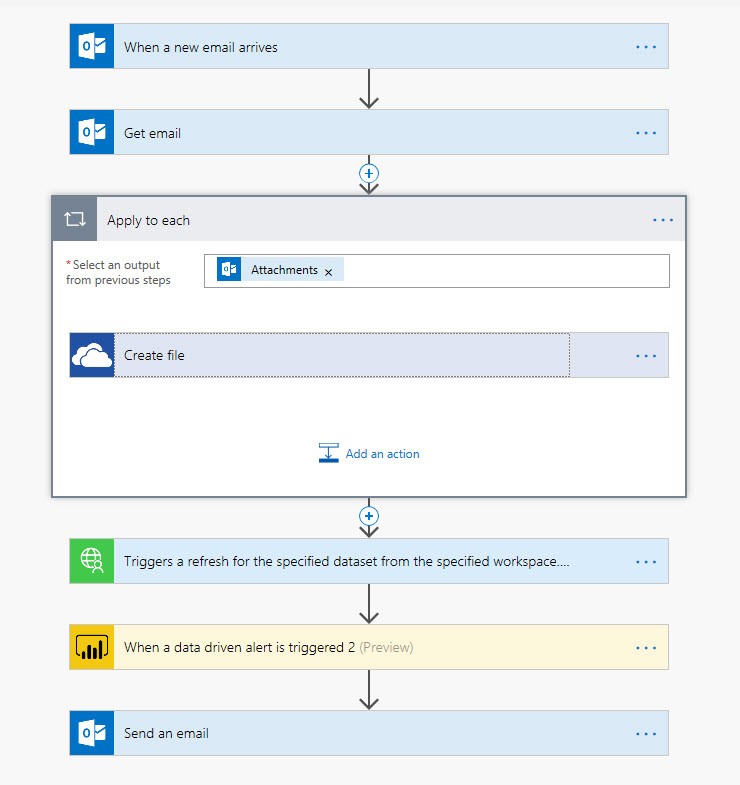
In my last 2 posts I’ve described a way to automatically validate attachments from incoming E-mails. Microsoft Flow would watch for incoming E-mails, that match certain criteria and move their attachments to a dedicated folder. Then it would trigger a refresh of a Power BI dataset, that has been designed to check for errors in those attachments. Data driven alerts in Power BI would indicate if there are errors and trigger a Flow that sends an E-mail back to the sender, informing him that his attachments didn’t meet the agreed criteria.
In this article I will now explain how not just a trigger about the existence of a faulty attachment could be passed back to Flow, but also the corresponding data itself. Therefore I write a query that exports data from Power BI to Flow. But watch out: This is not suitable for very big tables. I experienced timeouts at tables with 300k rows already. Also, you need a paid Power Automate license for the connector (Pricing | Microsoft Power Automate).
Read more