When downloading data from the web, it’s often best to grab the data from APIs that are designed for machine-to-machine communication than from the site that’s actually visible on the screen. Not only is the download usually faster, but you also often get more additional parameters that can be very useful. In this article I’m going to show you how to retrieve the relevant URLs for downloading files from webpages (without resorting to external tools like Fiddler) and how to tweak them to your needs.
Retrieving the URL to download files from webpages
Say I want to download historical stock prices from this webpage:
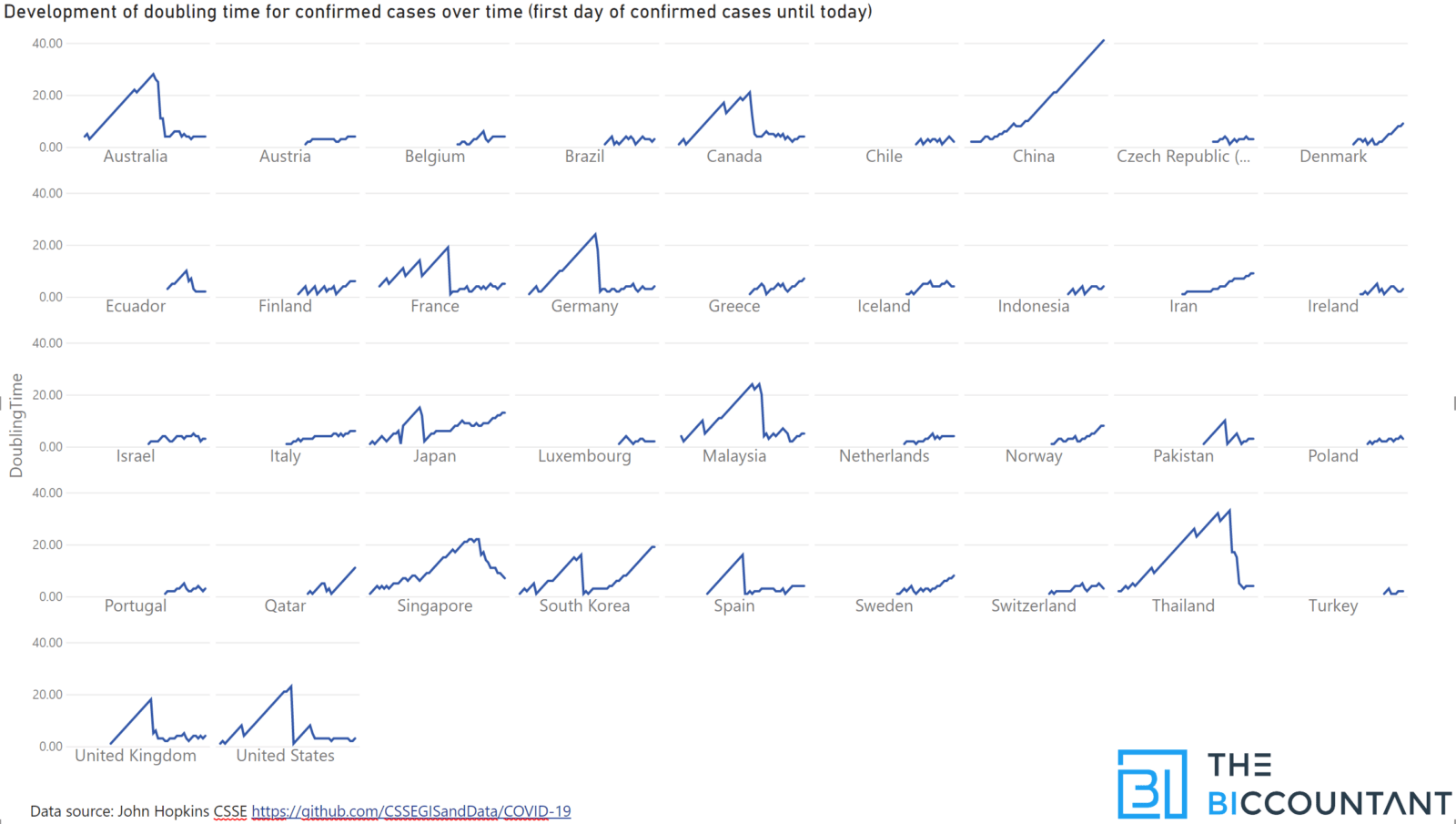
In this article I show methods to calculate the doubling time with DAX in Power BI. Doubling time is an indicator used for exponential growth scenarios. It indicates how much time it takes for a figure to double.
You might have come across it in studies covering the current COVID-19 epidemy like here for example. In there you see how many days it took for cases to double. But these figures are shown as snapshot of today and I think it’s also helpful to see their development over time. With a bit of DAX we’ll get there:
Low values mean high speed of growth, so the bottom area is the danger zone here. I find that a bit unusual and thought about displaying it the other way around with negative numbers instead:
When cleaning dirty data, you might have used the Trim-function (Text.TrimStart or Text.TrimEnd) to delete leading or trailing whitespace from your strings. However, did you know that you could use these functions as well to delete any other characters as well from the start or end of a string? Trimming text with custom characters is … Read more
Today I’m going to share my custom NETWORKDAYS function for Power Query with you that uses the same syntax than its Excel-equivalent.
NETWORKDAYS function
This function’s first 3 parameters work just like the Excel function and there is a 4th parameter that allows adjusting the day on which the week shall start:
Start as date
End as date
optional holidays as list of dates
optional number to change the start of the week from Monday (default: 1) to any other day (2 would mean that the week starts on Tuesday instead)
The function comes with a UI that lets you first choose a table containing the holidays and then choose the column with the holiday dates.
Benford’s Law compares the frequency distribution of leading digits to its (empirically proven) natural counterpart. This can then be used to detect fraud and errors. The green columns show how often each number should be the first digit in numbers that should follow the Benford-distribution. In black you’ll see the actual distribution of first digits … Read more
Edit 27th June 2021: There is a complete new version of this tool that has all the bugfixes and enhancements here: Power BI Cleaner – The BIccountant
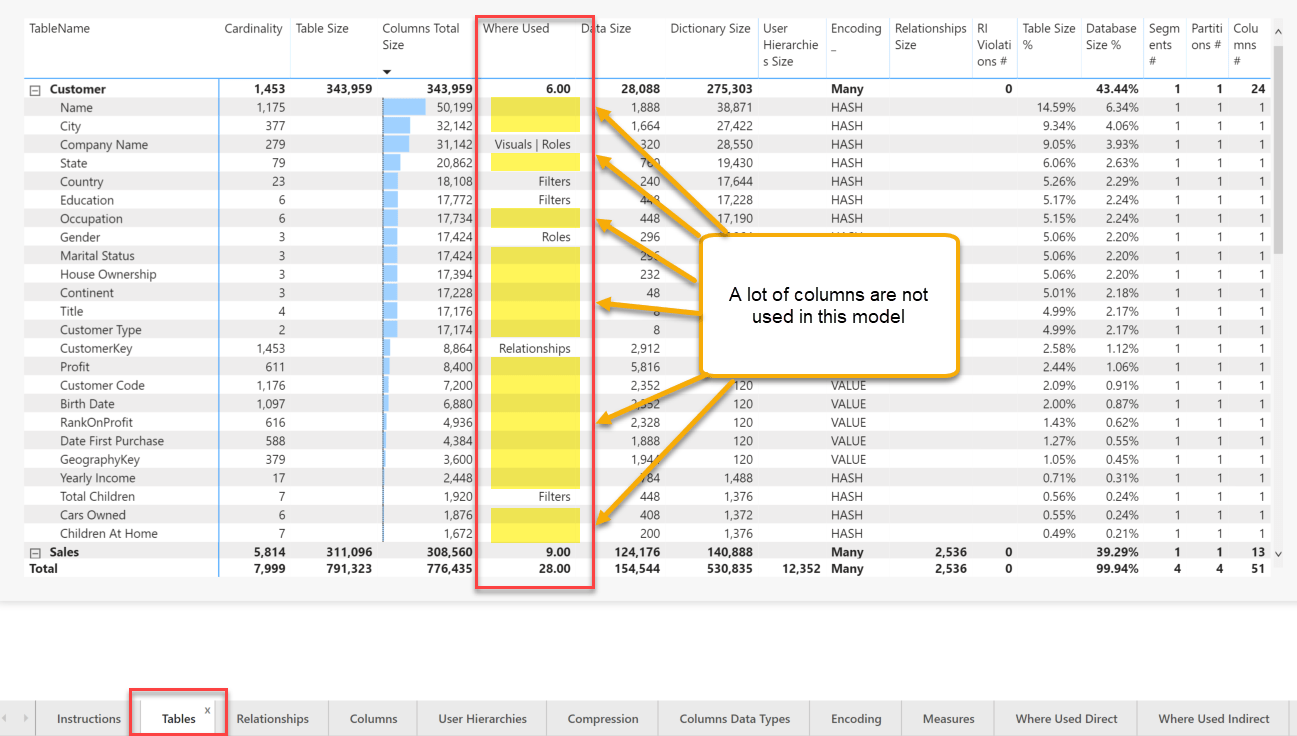
The VertiPaq-Analyzer tool is one of the great community tools that I really cannot live without. It gives me a great overview of all elements in my model and identifies potential performance problems by showing the storage requirements of each column. So when seeing expensive columns, the first question that arises is: “Do I really need this column or could I delete it?”. Luckily, this can now be answered with my new Power BI Cleaner tool. This tool shows the usage of all columns (and measures) within the tables of the VertiPaq Analyzer.
Power BI Cleaner shows unused columns in the VertiPaq-tables
Power BI Cleaner tool
So whenever there is no entry in the column “Where Used” you can go ahead and eliminate the column (or measure) from the model. Well – with two exception actually: Fields used in the definition of incremental load policies are currently not identified as well as used fields in calculation groups. So make sure to consider this before running wild 😉