This article shows a trick for a little problem that annoyed me for quite some time: How to get Table.TransformColumns transforming the values of a column with a reference to a value (from the same row) of another column?
1 Replace text by a value from another column
So instead of adding a new column where the “*” is replaced by the value from column “WhildcardValue”, I just want to perform the replacement-operation in the original “Text”-column, so that I don’t have to rename and delete the other columns later:

So far, I always ended up fighting with Table.TransformColumns-function and got quite frustrated because I couldn’t find a way to reference the (row-) value of the other column. As it turns out, I was fighting the wrong target here, because Table.ReplaceValue is actually the saviour for this challenge:
1.1 Check column “Text” -> Transform -> Replace Values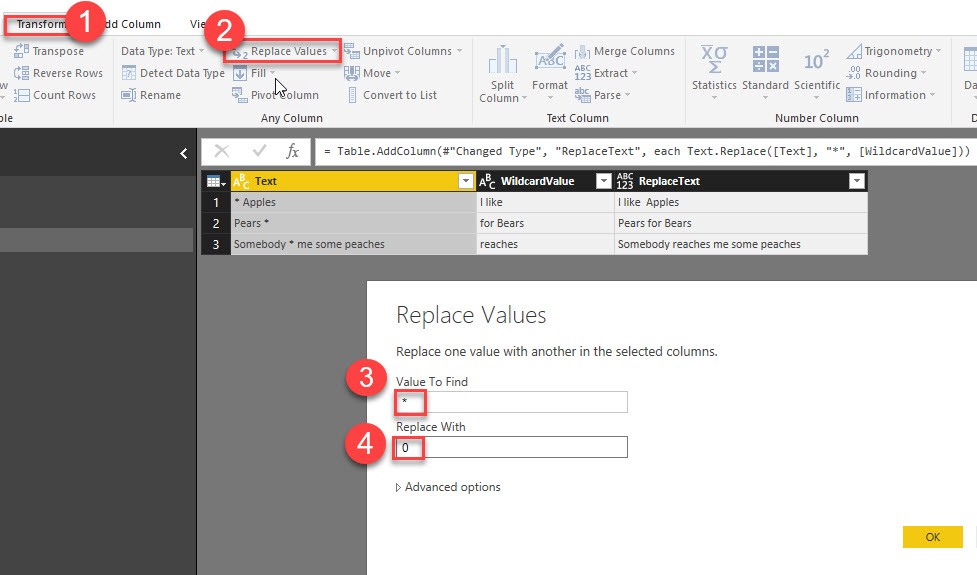
So in (4) we just filled in a dummy-value, which we’re going to replace with a reference to the desired column: “each [WildcardValue]” like this: