
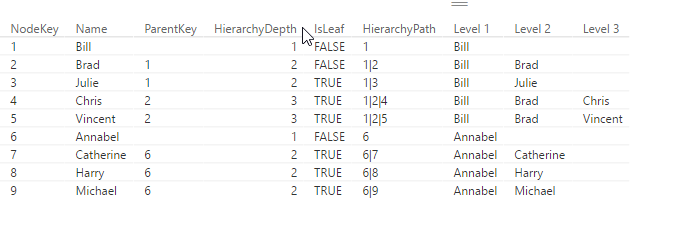
If you use DAX to flatten Parent-Child hierarchies you will end up with a table that has a static number of columns (like described here). If you need a dynamic solution instead, which creates just as many level-columns as there are needed for the current data, you can use DAX’s helper-tool Power Query (or Get Data in Excel) or the query-editor in PowerBI, which uses the language M.
Another advantage of this solution is that you can script the table creation in one step (only flaw: You still need to manually adjust your hierarchy though): But it saves time in creating the table, especially if you have many levels.
Update 2017-Dec-2: It also handles multiple parents now.
2 simple steps to flatten Parent-Child Hierarchies
- copy the following function,
- add a new step to your current table where you call this function, filling in the following parameters:
- table name (which is the name of the previous step in your M-query)
- name of the column with the child-key
- name of the column with the parent-key
- name of the column who’s values shall be shown in the levels (can also be child-key)

Endless loops
If the relationships in your data are ambiguous, i.e. items stand in parent-child as well as child-parent-relationship to each other, and endless loop would occur. The newest version (V2 upwards) caters for this possibility and will generate a warning and return only the rows that are subject to the endless loop to examine.
And this is the code: