
Advanced type detection in Power BI and Power Query: Table.ClassifyMixedColumnTypes

This is not a proper blogpost, just a quick share of a function I’ve created today which I think will be very useful for others as well: Automatic type detection will assign only one type to a column, but sometimes there are multiple types in it and then the type “any” will be applied, which means no … Read more

Multiple replacements or translations in Power BI and Power Query

A common task when cleaning data is to perform multiple replacements at once. When dealing with “translation tables” you might have come across Chris Webb’s solution using List.Generate to deal with this. This works fine – but might deliver unexpected results if you don’t consider it’s implications properly. Say we add lines like shown below, then we might expect the result as highlighted in yellow:
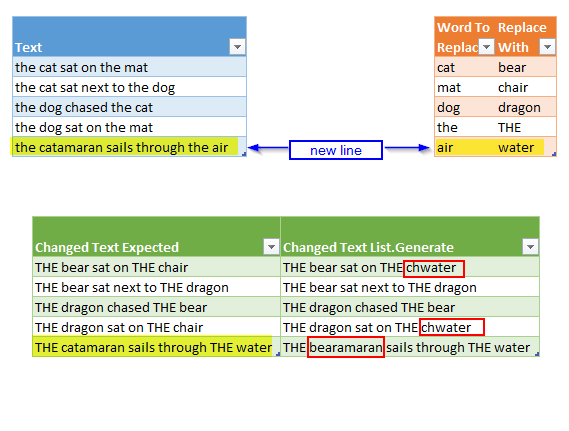
Image2
Multiple replacements using 2 different techniques

So hey – what happened here?: Our catamaran turns out as a bearamaran and the chair turns to chwater.
Read more

How to hack yourself in Power BI (and Power Pivot?)

Reading Gerhard Brueckl’s post on how to visualize SSAS calculation dependencies reminded me of my post about a similar technique from December last year.

His solution has features that would do my version good as well:

  1. Directly connect to the model to be analysed without clumsy export of measures to txt via DAX Studio
  2. Including calculated columns? No!: Who does calculated columns in DAX in PBI? Do them in the query editor using M instead (more functions, better compression, easier merge of model to SSAS once needed)

So wouldn’t it be cool if we could just add a documentation page to our current model – “all in one” so to speak? Here you find how to “hack”-connect with Excel to your current Power BI Desktop-Model.

So what works with Excel should work with PBI as well – just that we need to connect via the query-editor, using M. And of course: As we’re hacking ourselves here (i.e. the file we’re currently working on), we need to save our changes in order to make them being shown.

Read more