
This is about a technique that I’m going to use in my upcoming articles on ICT reconciliation. But as it is useful in other areas as well, it’s getting its own post here:
Say we want to pass the year and month as well as the type of accounts as filters/parameters into our reconciliation query. If our file is stored here:
C:\Users\Imke\Desktop\2015\08\\ICTRec201508_Transactions.xlsx,
we have everything we need. And when the next month comes, we even don’t have to adjust our query, as it will automatically take 09 as the months parameter, providing we store it in the correct folder.
Using: CELL(“filename”) will extract this information into the cell in Excel. Check this cell and pass it to Power Query (as table).
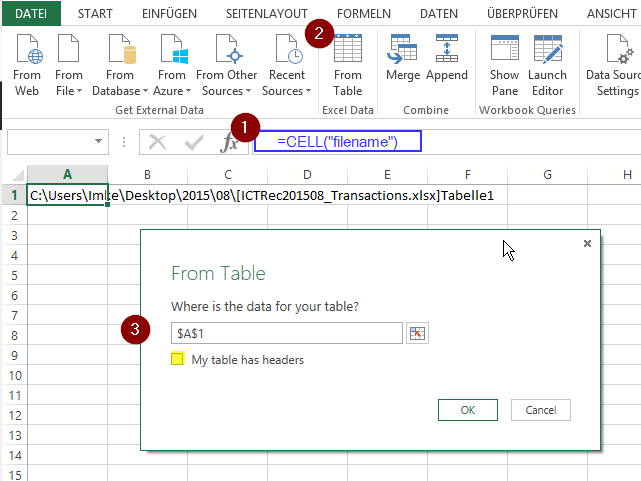
Now we just have to extract the relevant parts, using an ultracool ninja-trick I just picked up in the TechNet Forum: