It’s downing a bit slowly on me how awesome the direct retrieval of DMVs in PowerBI and PowerQuery actually is. Just see how easy we can build a cool view of our memory consumption in PowerBI:
Left: Tables – Right: Columns
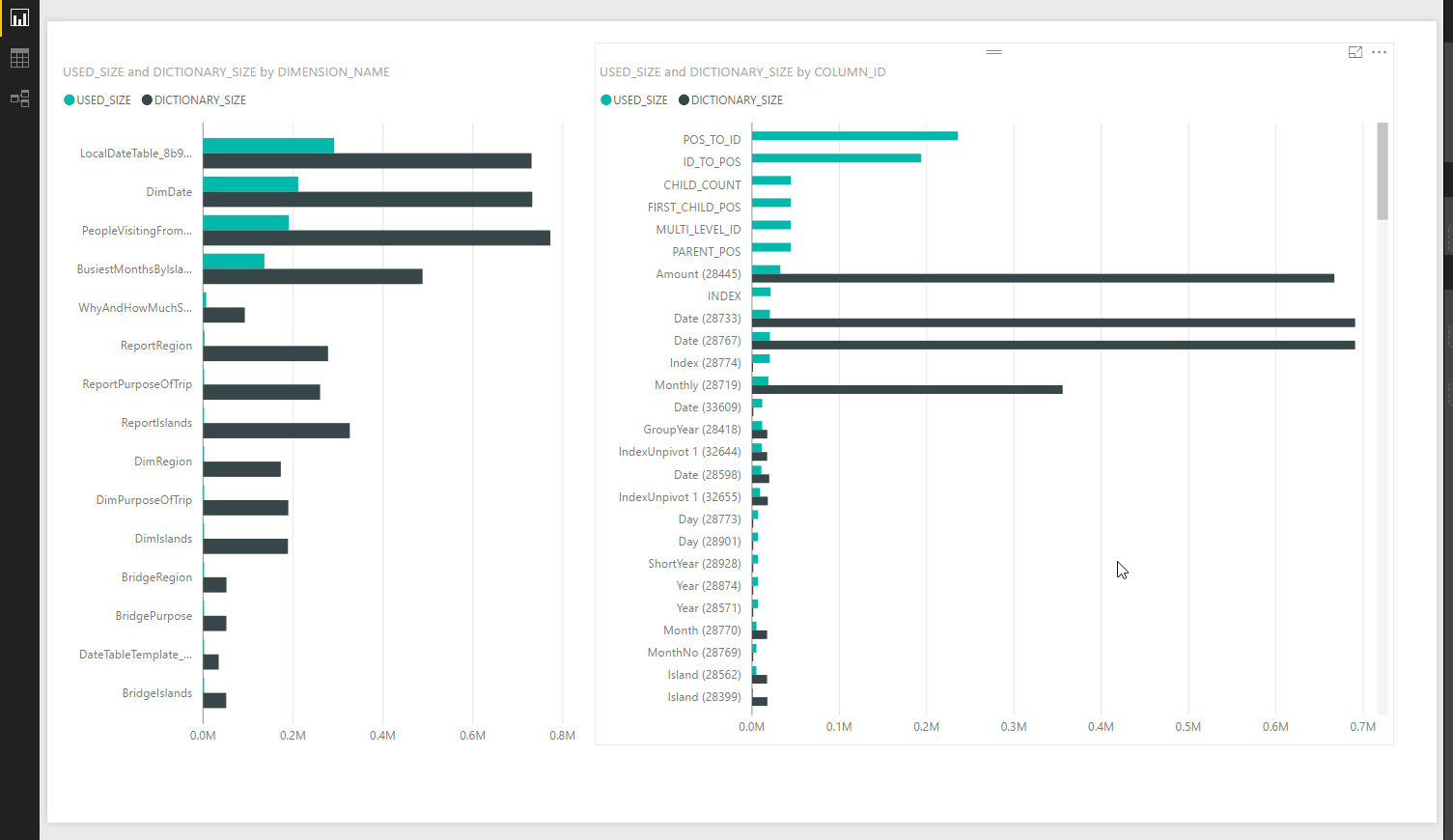

It’s downing a bit slowly on me how awesome the direct retrieval of DMVs in PowerBI and PowerQuery actually is. Just see how easy we can build a cool view of our memory consumption in PowerBI:
Left: Tables – Right: Columns
Reading Gerhard Brueckl’s post on how to visualize SSAS calculation dependencies reminded me of my post about a similar technique from December last year.
His solution has features that would do my version good as well:
So wouldn’t it be cool if we could just add a documentation page to our current model – “all in one” so to speak? Here you find how to “hack”-connect with Excel to your current Power BI Desktop-Model.
So what works with Excel should work with PBI as well – just that we need to connect via the query-editor, using M. And of course: As we’re hacking ourselves here (i.e. the file we’re currently working on), we need to save our changes in order to make them being shown.