
Especially when working with JSON-data, you might end up with a column that has elements of mixed types in it. The expand column – arrows will be missing, but some elements still need to be expanded, like here:
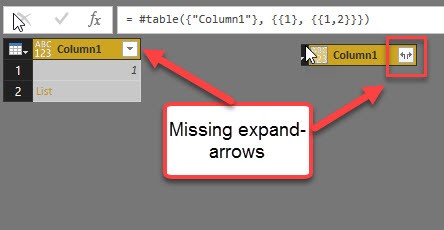
But there is an easy way to fix it:
Transform to expandable column
Table.TransformColumns(Source, {{“Column1”, each if Value.Is(_, type list) then _ else {_} }} )
It transforms the “Column1” from table “Source” by checking, if the content of the each row ( _ ) is of type list and if yes, keep that value ( _ ) and if not, transform it to a list (by framing it into curly brackets {_} )
Syntax for tables
Table.TransformColumns(Source, {{“Column1”, each if Value.Is(_, type table) then _ else #table({“ExpandTableColumnName”}, {{_}}) }})
Syntax for records
Table.TransformColumns(Source, {{“Column1”, each if Value.Is(_, type record) then _ else [a=_] }} )
File for Subscribers to download: HTExpandColumnThatCannotBeExpanded.zip
This technique should be applied to columns where the expandable elements all have the same structure. If that’s not the case, you should use this technique instead.
Enjoy & stay queryious 😉
Hi there
I have tried this for a column containing some rows of records and some rows of text. It didn’t work though and returned the error “We cannot convert a value of type Record to type Table”.
Has anyone else had this?
Cheers
Redmond
So you’ve probably used the formula for the table expansion instead the one for the record expansion. Try sth like this:
Table.TransformColumns(Source, {{“Column1”, each if Value.Is(_, type record) then _ else [a=_] }} )
I tried this using the record expansion and whilst it seems to work the data in the JSON is not beng imported. All the expanded records in Power BI contain null values. The original JSON contains string values. Am I missing something?
I’ve never experienced such a behaviour. So there might be an issue with how you adapted the code to your specific file.
Hello, thank you for posting this. I have question though, it is not working well with my column. My column have nulls and duration records.
When I apply this method I can expand the column but it converts my old value into nulls.Any idea what went wrong?
Thanks!
No, I cannot image what went wrong without seeing you you actually implemented the code.
Any chance you paste it here?
Hope my solution is helpful even after many years .. The strategy goes like this:
Find a row where your problem column has a record. Inspect the record to learn the field names. The code does the following:
1) If there is a record, use it unchanged – that’s the underscore after the “then”.
2) If there is a null, create an empty record – that’s the square brackets after the “else”. The empty record must have the same fields as the “real record”, but all fields can be set to null:
NewStep = Table.TransformColumns (PreviousStep, {{“name_of_problem_column”, each if Value.Is(_, type record) then _ else [record_field1=null, record_field2=null, record_field3=null] }} )
This gives you a column with only records, which all have the right fields, either empty or populated with the values from the existing record.
You can subsequently expand that column as usual.
Imke you are a life saver – thank you!
Ha, ha Mike – glad it helped you 🙂
Thanks, after some try and error it did the trick!
I’m getting the following error.
Expression.Error: We cannot convert a value of type List to type Text.
Details:
Value=[List]
Type=[Type]
I’m trying to transform a column that contains null, text and table as values.
Used query:
= Table.TransformColumns(#”Reordered Columns”, {{#”Reordered Columns”[value.sourceinfo.conditional.value], each if Value.Is(_, type table) then _ else #table({#”Reordered Columns”[value.sourceinfo.conditional.value]}, {{_}} )}} )
Hi Akshay,
you have the use the name of the column instead a reference to the column instead:
= Table.TransformColumns(#”Reordered Columns”, {{“value.sourceinfo.conditional.value”, each if Value.Is(_, type table) then _ else #table({“value.sourceinfo.conditional.value”}, {{_}} )}} )
//IMke
Thank you very much for taking the time to write this. This is the exact issue I am having with an XML dataset. I have a column that contains some rows of text (email addresses) and some rows of “table” (as well as a few nulls).
The “table” value is present when there are multiple email addresses on separate rows within the “front.article-meta.author-notes.corresp.email” column. I tried using this code but so far I have been unable to get it to work… I am a noobie so its probably something simple I am overlooking.
Query:
#”Conditional Column Expand” = Table.TransformColumns(#”front.article-meta.author-notes.corresp.email”, {{“front.article-meta.author-notes.corresp.email”, each if Value.Is(_, type table) then _ else #table({“front.article-meta.author-notes.corresp.email”}, {{_}}) }}),
Any help you could provide would be very much appreciated!
can you give us a sample, i dont get what to replace on the “_” value