
Black Scholes Option Pricing with Power Query in Power BI

The Black Scholes formula returns the value of European put and call options. The version I’m sharing here uses the standard normal cumulative distribution function from my previous blogpost. Algorithm For the implementation of this formula in M, I’ve used the R implementation from Financetrain for the ease of use: BlackScholes <- function(S, K, r, … Read more

Convert DateTime to ISO 8601 date and time strings in Power Query

Often, when querying APIs it is required to enter date and time filters in ISO 8601 format . Today I show a quick way to convert DateTime to ISO 8601 string, based on an ordinary DateTime field according to the following pattern:

2020-10-11T15:00:00-01:00

This represents the 11th October 3pm in UTC -1 timeszone.

Steps to convert DateTime to ISO 8601

If I enter:

#datetime(2020,10,11,12,0,0)

into the formula bar, it will be converted to :

11/10/2020 12:00:00

Comparing to the desired ISO format the year, month and days are in the wrong order. So using the universal Text.From function will not return the correct result.
Read more

Extract pattern string and numbers from text using List.Accumulate in Power Query

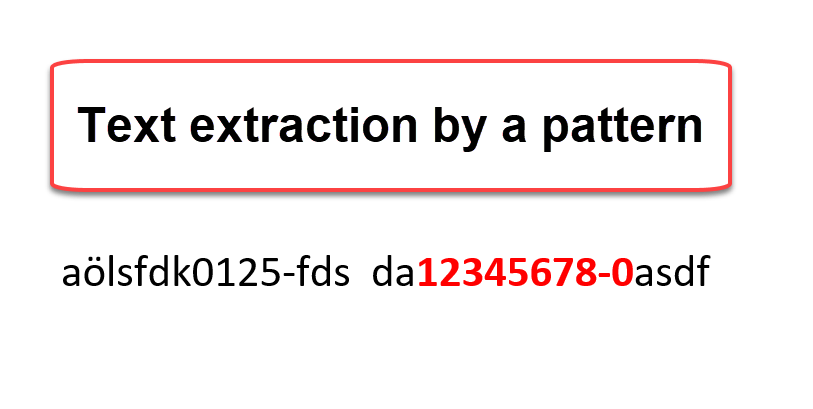
A typical task when cleaning data is to extract substrings from string that follow a certain pattern. In this post I’m going to describe a method that uses the List.Accumulate function for it. Extract a pattern string.

Task

I have to extract a payroll key from a description field that starts with 8 number, followed by an “-” and another number.

aölsfdk0125-fds  da12345678-0asdf

So I’m after the 12345678-0.

Plan

I plan to approach this by

Read more

How not to miss the last page when paging with Power BI and Power Query

paging pagination Power Query

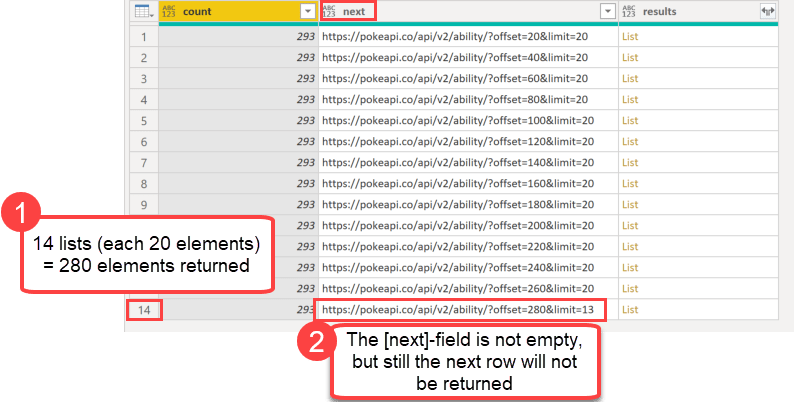
When you use an API with a paging mechanism (like the example from this blogpost), you’ll might work with a field that contains the address for the next page. You can use this to walk through the available chunks until you reach the last element. That last element in the pagination will not contain a next-field or that field will be null.

Paging in Power Query

In Power Query you can use the function List.Generate for it. According the latest function documentation it:

Generates a list of values given four functions that generate the initial value initial, test against a condition condition, and if successful select the result and generate the next value next.

So an intuitive implementation would look like so:

paging pagination Power Query
Initial code for paging: Will miss the last element

In the initial step (row 2) the API will be called and returns this record:

Read more

Trimming text with custom characters in Power BI and Power Query

When cleaning dirty data, you might have used the Trim-function (Text.TrimStart or Text.TrimEnd) to delete leading or trailing whitespace from your strings. However, did you know that you could use these functions as well to delete any other characters as well from the start or end of a string? Trimming text with custom characters is … Read more

Date.Networkdays function for Power Query and Power BI

Today I’m going to share my custom NETWORKDAYS function for Power Query with you that uses the same syntax than its Excel-equivalent.

NETWORKDAYS function

This function’s first 3 parameters work just like the Excel function and there is a 4th parameter that allows adjusting the day on which the week shall start:

  1. Start as date
  2. End as date
  3. optional holidays as list of dates
  4. optional number to change the start of the week from Monday (default: 1) to any other day (2 would mean that the week starts on Tuesday instead)

The function comes with a UI that lets you first choose a table containing the holidays and then choose the column with the holiday dates.

Read more
